This article will show will help to Resize Images Using Paint
You can edit images in Photoshop. If you do not have Photoshop, you can use Paint on a Windows platform. Paint is found in All Programs > Accessories.
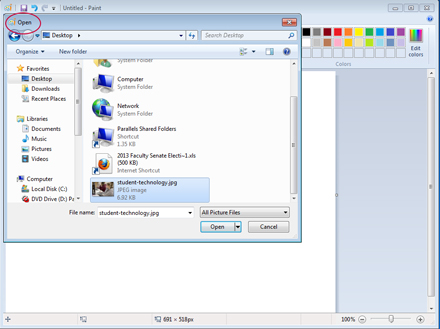
- Open the application, then Open the Image.
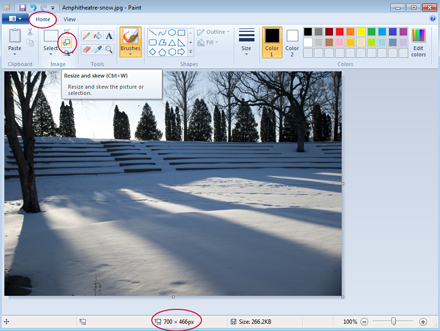
- From the Home Tab, select the Resize and Skew Icon (note the original pixel size shown near the bottom)
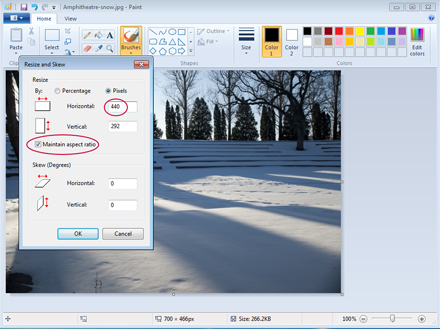
- Make sure there is a check mark in the box next to Maintain aspect ratio; then set the width and click OK.
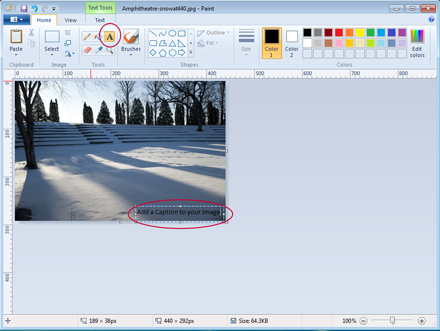
- You can also add a caption using the Text tool in Paint
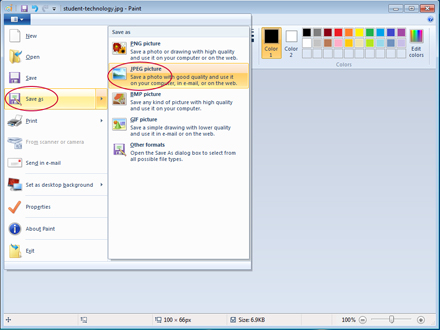
- Click the main tab; choose Save as; choose JPEG. Enter a short descriptive name, no spaces, and save. Your image is now ready to upload